Legal teams depend on organized, accurate, and easy-to-access information to work efficiently. As digital workflows expand across law firms, the need for reliable file management tools has become essential. Attorneys and staff handle documents in large volumes, from pleadings and evidence to contracts, agreements, and internal notes.
Without a clear structure for managing digital files, teams can lose time, overlook important details, or struggle to maintain consistency across cases.
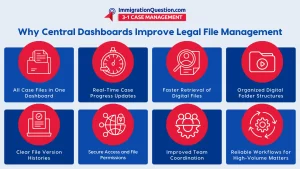
Central dashboards showing case progress give legal teams a clear view of every matter. When combined with strong file management systems, these dashboards help ensure documents stay organized, updated, and accessible throughout the lifecycle of a case. This improves productivity, reduces administrative strain, and supports more confident decision making.
Why True File Management Matters in Legal Practice
True file management goes beyond storing documents. It includes the structure, retrieval, organization, and oversight required to keep legal information consistent and protected. Legal teams work with sensitive data that must be securely handled and properly categorized.
Effective file management supports:
- Organized digital files that can be retrieved quickly
- Consistent naming conventions
- Clear folder structures
- Reduced duplication or outdated versions
- Secure access for authorized staff
Legal work demands accuracy at every stage. Proper file management strategies help prevent errors and keep documentation aligned with the procedural needs of each case.
How File Management Tools Improve Daily Workflows
File management tools give legal teams the systems they need to handle documents efficiently. These tools help law firms keep track of file versions, categorize documents, and maintain clarity even when handling large caseloads.
Key advantages include:
- Streamlined document intake
- Faster retrieval of digital files
- Better accuracy in organizing digital files
- Stronger control over document status
- Improved collaboration among teams
With the right file management solutions, firms can reduce time spent searching for documents and ensure that staff always work with the most recent and accurate version of each file.
The Role of Central Dashboards Showing Case Progress
Central dashboards showing case progress help legal teams move away from scattered updates and manual oversight. Instead, information from multiple sources is brought into one unified view.
These dashboards offer:
- A clear overview of active and upcoming tasks
- A centralized place to review document uploads
- Visibility into case-related deadlines
- Updated status for filings, drafts, and approvals
- Fewer communication gaps between team members
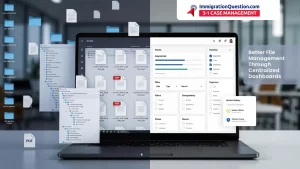
By combining file management and case progress tracking in one system, teams can stay aligned and prevent avoidable delays. This helps attorneys respond to client questions more confidently and manage workloads with greater control.
Common File Management Strategies for Legal Teams
Legal teams rely on structured file management strategies to maintain order in fast-moving environments. Some common approaches include:
- Clear folder hierarchies organized by matter
- Consistent naming conventions for all digital files
- Regular file reviews to remove duplicates
- Categorizing documents by type, importance, or workflow stage
- Tagging documents for easier filtering
- Maintaining audit trails for accuracy and compliance
When these strategies are applied consistently, file management becomes a dependable part of the legal workflow rather than an administrative challenge.
File Organization Tips for Better Legal Workflows
Simple file organization tips can make a significant difference in efficiency:
- Store documents in a single, unified system instead of across multiple locations
- Separate working drafts from final versions
- Use descriptive file names to identify content quickly
- Standardize folder naming across the entire firm
- Ensure that all staff follow the same filing process
These practices support clarity, reduce confusion, and help teams stay focused on legal tasks rather than administrative sorting.
How ImmigrationQuestion.com 3‑in‑1 Case Management Supports File Management
ImmigrationQuestion.com 3‑in‑1 Case Management includes tools that help legal teams manage files, organize digital documents, and maintain visibility across all case-related materials. By bringing documents, case timelines, and activity updates into a centralized space, the platform supports consistent and structured legal workflows.
Integrated Document Storage
The system stores documents securely within each matter, helping attorneys and staff access files without searching across different platforms.
Organized File Retrieval
Built-in categorization and filters make it easy to locate digital files quickly, even during high-volume periods.
Clear Activity Records
When new documents are uploaded or edited, the system tracks these updates so teams can follow changes as they occur.
Unified Case Oversight
By pairing file management with progress tracking, the platform helps teams see both documents and case status together, reducing administrative friction and improving workflow continuity.
Key Takeaways
- Central dashboards showing case progress help legal teams stay organized and informed.
- File management tools support efficient document handling and timely access to important records.
- Organizing digital files with clear structures reduces errors and improves legal accuracy.
- Strong file management strategies help maintain consistency across cases.
- File management solutions assist law firms in handling high document volumes with ease.
- File organization tips help teams maintain clarity and reduce administrative tasks.
- Integrated systems like ImmigrationQuestion.com 3‑in‑1 Case Management bring file management and case oversight together for smooth workflows.
Frequently Asked Questions
- Why is true file management important in legal practice?
It ensures accurate, organized, and accessible digital files that support legal deadlines and reduce mistakes. - How do file management tools help legal teams?
They streamline storage, retrieval, version control, and document organization. - What is the value of central dashboards showing case progress?
They give legal teams a unified view of case updates, tasks, and document changes. - What are common file management strategies?
Clear naming systems, structured folders, tagging, and regular file reviews. - How can digital file management improve efficiency?
It reduces time spent searching for documents and supports consistent workflows. - What makes file organization essential for accuracy?
Well-organized files prevent duplicate documents, outdated versions, and administrative confusion. - Does ImmigrationQuestion.com 3‑in‑1 Case Management support file management?
Yes. It provides structured digital storage, organized retrieval, and clear tracking. - How can firms improve file management across teams?
By standardizing procedures, using centralized tools, and applying consistent file organization tips.