
Managing court schedules, dockets, and case records manually is time-consuming and error-prone. As your caseload grows, so does the risk of missed deadlines, disorganized information, and unnecessary administrative work that slows your team down.
A single overlooked entry or misplaced document can disrupt an entire case, creating stress for your staff and uncertainty for your clients. Over time, these small inefficiencies can add up, affecting both productivity and your firm’s reputation.
Court management software offers a smarter way to stay organized, reduce errors, and keep your entire team aligned, giving you the clarity and control needed to manage every case confidently.
Why Manual Court Management Still Causes Costly Errors
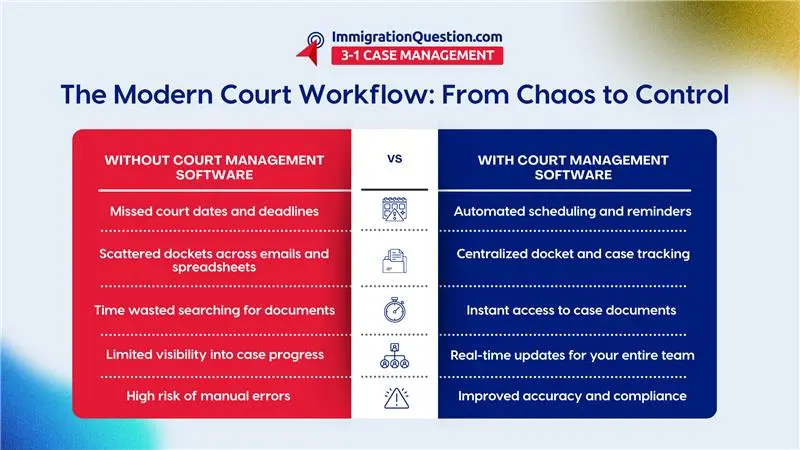
Many law firms still rely on spreadsheets, shared drives, emails, and even paper files to manage court schedules and records.
While these methods may seem manageable at first, they quickly become inefficient as caseloads grow.
Common challenges include:
- Missed or duplicated court dates
- Disorganized dockets across multiple systems
- Difficulty locating case documents quickly
- Lack of real-time updates across team members
- Increased administrative workload
Even small inefficiencies can lead to serious consequences, especially when deadlines and compliance are involved.
What Is Court Management Software?
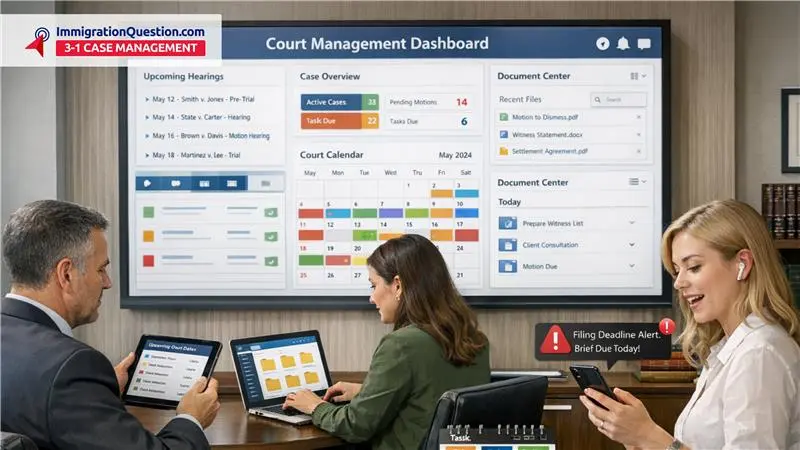
Court management software is a centralized digital solution that helps law firms manage scheduling, dockets, documents, and workflows in one place.
Instead of juggling multiple tools, legal teams can operate from a unified system that keeps everything organized and accessible.
Modern court case management software goes beyond basic tracking. It connects your firm’s daily operations into one streamlined workflow.
How Court Management Software Simplifies Scheduling
Eliminate Calendar Conflicts
Managing court appearances, filing deadlines, and client meetings manually increases the risk of overlap or missed commitments.
Court management software automatically syncs schedules across your entire team, ensuring everyone is working from the same calendar.
Automated Reminders and Alerts
Deadlines are non-negotiable in legal practice. Missing one can have serious consequences.
With court software solutions, automated reminders help ensure nothing is overlooked:
- Court dates
- Filing deadlines
- Client meetings
- Internal milestones
Notifications can be customized for individuals or teams, helping everyone stay on track.
Real-Time Updates Across Teams
When a schedule changes, everyone needs to know immediately.
A centralized system ensures updates are reflected instantly, reducing confusion and preventing miscommunication.
Streamlining Docket Management
Centralized Case Tracking
Dockets are the backbone of legal case management. When they are scattered across systems, it becomes difficult to maintain accuracy.
Full court case management systems consolidate all docket information into one platform, making it easy to track:
- Case status
- Upcoming events
- Filing history
- Assigned team members
Improved Visibility and Accountability
With everything in one place, attorneys and staff can quickly understand the status of any case.
This level of transparency improves accountability and reduces the need for constant check-ins.
Reduce Administrative Burden
Manually updating dockets takes time and increases the likelihood of errors.
Court case software automates updates and simplifies tracking, allowing your team to focus on higher-value work.
Organized And Secure Record Management
Centralized Document Storage
Searching through emails and folders for a single document can waste valuable time.
Court management software provides a centralized repository where all case-related files are stored and easily accessible.
Version Control and Audit Trails
Keeping track of document versions is critical, especially in active cases.
Modern court software solutions include version control and audit logs, so you always know:
- Who made changes
- When changes were made
- What was updated
Enhanced Security and Compliance
Legal data is sensitive and must be protected.
Cloud-based court case management software offers advanced security features such as:
- Role-based access controls
- Data encryption
- Secure backups
This helps ensure compliance with industry standards while protecting client information.
Key Features That Drive Efficiency
The best court management software solutions offer more than just scheduling and document storage.
Here are some essential features that improve overall performance:
Case Management Dashboard
A single dashboard provides a clear overview of all active cases, deadlines, and tasks.
Time Tracking and Billing Integration
Track billable hours accurately and integrate them with your billing system to improve revenue capture.
Client Communication Tools
Secure portals and messaging systems make it easier to communicate with clients and share updates.
Workflow Automation
Automate repetitive tasks such as document generation, reminders, and status updates.
How To Implement Court Management Software Successfully
Transitioning to new software can feel overwhelming, but a structured approach makes the process smoother.
Step 1: Assess Your Current Workflow
Identify bottlenecks in your current system, including scheduling conflicts, document management issues, and communication gaps.
Step 2: Define Your Goals
Determine what you want to achieve, such as reducing missed deadlines or improving case visibility.
Step 3: Choose The Right Solution
Look for court software solutions that align with your firm’s size, practice area, and growth plans.
Step 4: Train Your Team
Provide comprehensive training to ensure everyone understands how to use the system effectively.
Step 5: Monitor And Optimize
Regularly review performance and make adjustments to maximize efficiency.
Court Management Software Vs Traditional Methods
Traditional Approach
- Manual scheduling
- Fragmented document storage
- Limited visibility into case status
- Higher risk of human error
Court Software Solutions
- Automated scheduling and reminders
- Centralized case and document management
- Real-time updates
- Improved accuracy and efficiency
The difference is not just convenience. It is a fundamental shift in how law firms operate.
Best Practices for Maximizing Results
To get the most out of your court case management software, consider these best practices:
- Standardize data entry processes
- Use automation wherever possible
- Regularly update case information
- Encourage team-wide adoption
- Conduct periodic system audits
Consistency is key to unlocking the full value of your software.
Why Modern Law Firms Are Making the Switch
The legal industry is becoming increasingly competitive, and clients expect faster, more transparent service.
Court management software allows firms to:
- Respond more quickly to client needs
- Reduce operational inefficiencies
- Improve overall service quality
- Scale operations without added complexity
Firms that adopt modern tools position themselves for long-term success.
Take Control of Your Court Operations
Managing schedules, dockets, and records should not feel like a constant struggle.
Court case management software simplifies your workflow, reduces errors, and allows your team to focus on what matters most: delivering excellent legal service.
If your firm is ready to improve efficiency and eliminate unnecessary stress, now is the time to make the change.
Schedule a free demo today to see how ImmigrationQuestion.com 3-1 Case Management can transform your law firm’s workflow and help you stay organized, compliant, and ahead of every deadline.
Frequently Asked Questions
1. What Is Court Management Software?
Court management software is a digital system that helps law firms manage case schedules, dockets, documents, and workflows in one centralized platform, improving organization and efficiency.
2. How Does Court Case Management Software Improve Scheduling?
Court case management software automates calendars, sends deadline reminders, and updates schedules in real time, helping law firms avoid missed court dates and scheduling conflicts.
3. What Features Should I Lookforin Court Software Solutions?
Key features include case tracking, automated scheduling, document management, time tracking, client communication tools, and secure cloud storage for easy access and compliance.
4. Can Court Management Software Reduce Administrative Work?
Yes. By automating tasks like docket updates, document organization, and reminders, court management software reduces manual work and allows legal staff to focus on higher-value tasks.
5. Is Court Case Software SuitableforSmall Law Firms?
Yes. Court case software is scalable and can help small firms stay organized, reduce errors, and manage growing caseloads without needing additional administrative staff.