

The courtroom clerk is already three coffees in. Amongst the things he has to deal with are stacks of paper, a flood of emails from attorneys, and last-minute motions that seem to appear out of nowhere. Somewhere else, a paralegal is digging through a filing cabinet for a document that could decide whether a hearing happens today or next week. The phones keep ringing, deadlines are slipping, and staff are running on adrenaline and sticky notes.
Sound familiar? Most people who work in courts or law firms are familiar with this scene, and it isn’t just stressful, it’s expensive, inefficient, and frankly preventable.
What if every case, every filing, every client update could be stored in one central, secure location, accessible to the right people instantly? That’s what modern court software solutions promise: transforming cluttered chaos into smooth operations, errors into confidence, and hours of manual work into time that staff can spend on what really matters: justice.
Why Courts Can’t Afford to Ignore Software
Judicial offices, like law firms, often operate under the assumption that “we’ve always done it this way,” but that mindset comes with a cost. Paper files pile up, deadlines slip through cracks, and transparency is more a hope than a practice.
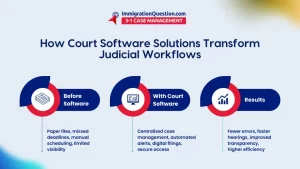
Without modern software, clerks spend hours hunting for documents, attorneys chase updates manually, and judges juggle calendars that feel like puzzles. Missed filings, lost motions, and delayed hearings aren’t minor inconveniences—they can erode public trust, increase costs, and slow the wheels of justice.
Court case management software changes this entirely. By centralizing case information, automating repetitive tasks, and keeping everyone—from judges to clerks to attorneys—on the same page, it transforms how courts function.
Full court case management doesn’t just save time; it restores confidence in the process, ensuring that cases move efficiently, accurately, and with accountability. It’s less about bells and whistles and more about giving staff the tools to do their work without running themselves ragged.
The Features That Actually Make a Difference
Not all court software is created equal, and the features matter more than the brand name. The right system anticipates daily struggles rather than adding unused extras that clutter the interface. Among the features that truly transform workflow:
- Centralized Case Management: All case files, filings, and motions are stored in a single secure location. No more frantic searching through folders or emails.
- Document Automation: Forms, notices, and filings are generated quickly and correctly, reducing human error.
- Scheduling and Alerts: Automated reminders ensure hearings, deadlines, and submissions happen on time without constant follow-ups.
- Secure Client and Stakeholder Portals: Allow authorized users to check case updates without compromising sensitive information.
- Analytics and Reporting: Turn data into actionable insights, from identifying bottlenecks to tracking staff performance.
When these tools work together, staff can focus on tasks that require judgment and expertise instead of wasting hours on administrative chores.
Real-World Applications
Consider a mid-sized court system that recently implemented full court case management software. Before adoption, clerks spent a significant portion of their week updating files manually, tracking motions, and sending reminders. After implementing the software, filing errors dropped by 70 percent; hearings ran on schedule 95 percent of the time, and staff saved an average of 10 hours per week on administrative tasks.
Judges and attorneys reported smoother communication, while litigants experienced fewer delays. This isn’t hypothetical; it’s happening in courts across the country, proving that software adoption isn’t just a tech upgrade—it’s a transformation in workflow, efficiency, and morale.
Implementing Court Software Without Stress
Installing a new system might sound intimidating, but careful planning makes the process manageable. It starts with assessing existing workflows to identify bottlenecks and repetitive tasks, then selecting software that matches the court’s volume, structure, and culture. Training is critical: if staff don’t understand the software, its benefits disappear.
A phased rollout, combined with careful data migration and continuous support, ensures that the transition is smooth. Over time, what was once a daily headache—chasing files, sending reminders, and double-checking deadlines—becomes a system that works quietly in the background, freeing staff to focus on more meaningful work.
Courts often see these improvements materialize as:
- Fewer filing errors and missed deadlines
- Faster hearing scheduling
- More transparent communication among staff, attorneys, and judges
- Higher staff satisfaction and lower burnout
These benefits are tangible and measurable, making the case for software adoption hard to ignore.
Best Practices for Adoption
Even the best software fails without proper implementation and ongoing management. Judicial administrators should involve staff early in the process, ensuring they feel heard and included. Clear protocols for usage and data entry prevent mistakes, while regular training sessions keep everyone up to date on features and best practices.
It’s also essential to monitor performance metrics continuously and adjust workflows as needed. Over time, these small but consistent efforts compound, turning a software system into a true operational advantage rather than just a digital filing cabinet.
Time, Trust, and Transformation
Courts are about people—judges, clerks, attorneys, and the public they serve. People do their best work when the systems around them are reliable and predictable. Cloud-based court software solutions don’t just make life easier for staff; they enhance transparency, protect data, speed case resolution, and free staff to focus on high-value tasks.
For judicial administrators ready to take the leap, the next step is straightforward: schedule a free demo with ImmigrationQuestion.com 3-1 Case Management and see how full court case management can improve efficiency, accuracy, and morale. The difference isn’t just about saving time—it’s about running a courtroom with clarity, precision, and far less daily chaos.
Frequently Asked Questions
- What is court case management software?
Court case management software is a digital system that helps courts and legal offices track cases, manage documents, schedule hearings, and maintain accurate records, all in one secure platform. It streamlines workflows, reduces errors, and improves efficiency.
- How does court software improve efficiency in judicial offices?
By centralizing case files, automating routine tasks like scheduling and document generation, and providing real-time access to case updates, court software minimizes manual work and allows staff to focus on higher-value tasks.
- What features should I look for in court software solutions?
Key features include centralized case management, document automation, scheduling and alert systems, secure client portals, and reporting or analytics tools. These features ensure accuracy, transparency, and smooth operations.
- How difficult is it to implement court software?
Implementation requires planning, staff training, and careful data migration, but a phased rollout with ongoing support can make adoption smooth. Proper implementation often leads to fewer errors, faster hearings, and higher staff satisfaction.
- Can court software help reduce errors and missed deadlines?
Yes. By automating reminders, providing centralized access to case files, and tracking deadlines, court software significantly reduces filing errors and missed deadlines, improving overall court efficiency and reliability.