
Legal practice management software is the system that keeps your firm running.
When legal practice management works, cases progress as they should, and clients stay satisfied. When it doesn’t, business takes a plunge.
So, what actually makes a good legal practice management software?
Let’s break it down.
Case Management
A solid practice management software keeps every case detail in one place.
You should be able to see deadlines, tasks, contacts, and notes tied to each matter. Instantly.
Good systems do this:
- Centralize case records.
- Track deadlines automatically.
- Tie tasks directly to each case.
Everything stays organized even when work volume increases.
Document Management
Legal work involves documentation, which is why document disarray kills productivity.
Good legal practice management software gives you:
- A secure cloud space for all documents.
- Version control, so you’re never working on the wrong file.
- Fast search. No digging through folders.
- Templates for repeat documents.
And they have automation features that speed up work.
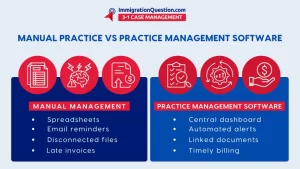
Time Tracking & Billing
Missed time equals lost money. A good legal practice management system captures work as it happens.
Look for features like:
- Built-in time tracking per matter.
- Automated invoices.
- Support for hourly, flat fee, and contingency billing.
- Trust accounting tools where required.
Client Communication
Clients want to be able to get updates easily. Modern practice management software allows this by offering built-in client communication features.
That means:
- Secure client portals.
- Messaging is tied to the case.
- Automated reminders and updates.
You no longer need email threads, calls, or external messaging tools to keep clients informed.
Smart Calendar & Deadline Control
Good legal practice management software connects calendars to case activity, so deadlines aren’t missed.
You should get:
- Automatic deadline reminders.
- Court date tracking.
- Internal milestone alerts.
- Calendar sync with Outlook or Google.
Reporting That Informs
You can’t improve what you don’t see. Strong practice management software shows you:
- Billing performance.
- Case progress.
- Bottlenecks.
- Profitability by matter or client.
This gives you the insight you need to make informed decisions.
Seamless Integrations
A good legal software connects with:
- Email.
- Accounting tools.
- E-signature platforms.
- Calendars.
This way, data is managed better.
Custom Workflows & Automation
No two firms work the same way. That’s why good legal practice management tools let you customize workflows.
You can:
- Build workflows by matter type.
- Automate follow-ups.
- Trigger tasks and reminders automatically.
Optimum Security
Legal data is sensitive.
A strong practice management software protects it with:
- Role-based access.
- Encryption in transit and at rest.
- Full audit logs.
- Compliance-ready controls.
This way, your clients trust you more.
Client Intake & CRM Features
The work starts before the case starts. Good legal practice management software helps you manage leads and intake. That includes:
- Intake forms that turn into matters.
- Lead tracking.
- Follow-up automation.
Mobile & Remote Access
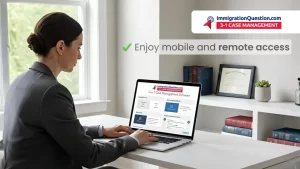
Lawyers don’t sit at desks all day. Modern practice management software allows you to work anywhere.
On your phone. On your tablet. On the road.
You can:
- Check case status.
- Log time.
- Review documents.
- Message clients.
Work keeps moving even when you’re not in the office.
Easy-to-Use Client Portals
A client portal shouldn’t feel like extra work. Good ones let clients:
- View documents.
- Track case status.
- Sign files.
- Send secure messages.
Everyone wins when there’s transparency.
A Smarter Way to Run Your Practice
ImmigrationQuestion.com 3-1 Case Management brings together the core pieces of legal practice management in one system. Case tracking, documents, tasks, billing activity, and client communication are all connected, so you’re not jumping between tools to get work done.
If you’re looking for legal practice management software that fits how you operate, this is a great choice. You can explore it through a free trial or schedule a demo to see how it works in real practice.
Frequently Asked Questions
1. What is legal practice management software?
It’s a system that helps you manage cases, documents, deadlines, billing, and client communication in one place. It replaces scattered tools with a single workflow.
2. Who should use practice management software?
Any firm handling multiple matters at once. Solo attorneys, small firms, and growing practices all benefit once volume and deadlines start stacking up.
3. How does legal practice management improve daily work?
It keeps tasks, documents, and deadlines tied to each case. So, you always know what’s due, what’s done, and what needs attention next.
4. Is legal practice management software secure?
Yes, when built properly. Good platforms like ImmigrationQuestion.com 3-1 Case Management use encryption, access controls, and audit logs to protect client data and meet compliance needs.
5. Can practice management software support remote work?
It can. Cloud-based systems let you access cases, files, and calendars from anywhere, whether you’re in court, at home, or traveling.
6. Does legal practice management software help with billing?
It does. Time tracking, expense capture, and invoicing are linked to case activity, which reduces missed billables and billing delays.
7. How do I choose the right practice management software?
Look for tools that match how your firm works today. Focus on ease of use, case visibility, automation, and how well it fits your practice area. Start a free trial or schedule a demo to use ImmigrationQuestion.com 3-1 Case Management tool.