
Legal work doesn’t happen in isolation.
Attorneys work with paralegals, assistants, clients, co-counsel, and sometimes outside experts. And when that collaboration breaks down, workflow is disrupted. Files get lost, emails pile up, and deadlines creep.
That’s where legal collaboration tools come in. They bring people, documents, and conversations into one system.
Legal Document Management
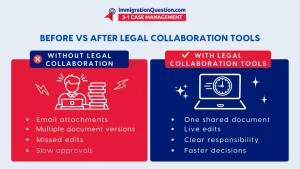
Strong legal document management is the backbone of collaboration. Files live in one place, notes stay attached, and versions are tracked automatically.
This way, you’re not digging through email threads or shared drives, worrying about working on the wrong draft.
You can easily access the right file. That cuts wasted time and protects work quality.
Communication Is Efficient
Multiple communication systems pull conversations away from the case. Collaboration tools keep them where they belong.
Comments, updates, and questions stay tied to the case, encouraging legal collaboration rather than scattered messages across inboxes.
This way, newly added team members don’t have to start from scratch. They can see the chat history, and you don’t repeat yourself.
Real-Time Collaboration Supports Better Decisions
Legal work moves fast, so delays cost clients time and money.
A business platform for real-time legal document collaboration lets teams react immediately. You review drafts together and flag issues early. You resolve questions before they become problems.
And decisions happen with the full picture in view.
Clients See Progress Easily
Modern collaboration tools often include secure client access. Clients can view shared documents, follow milestones, and send messages.
This improves transparency and reduces friction. Clients stay informed, and you control the flow of information.
Cloud Legal Services Are Ideal
Work doesn’t always stop when you leave the office, and legal teams don’t stay in one place.
Cloud legal services let attorneys collaborate from court, home, or across borders. Documents and discussions are accessible and secure.
It’s ideal for remote and hybrid work, which strengthens workflows.
Legal Document Sharing Without Risk
Secure legal document sharing is non-negotiable. Collaboration platforms use permissions, encryption, and audit trails to protect sensitive data.
You decide who sees what, and track activity automatically. Compliance stays intact. Top-tier security supports collaboration and prevents downtime.
Accountability Becomes Visible
When tasks and updates are in one system, responsibility is clear. You know who is in charge of what, who is efficient, and who is lagging.
That visibility reduces missed steps and finger-pointing. Work gets done because it’s obvious who’s doing it.
Fewer Errors. Better Work Product.
When teams rely on outdated drafts or unclear instructions, errors are more frequent. Collaboration tools fix that by keeping everyone on the same page.
Version control, shared comments, and real-time edits maintain accuracy. This keeps your reputation intact.
Collaboration Scales as the Firm Grows
As caseloads increase, these platforms keep workflows steady. You add matters without feeling overwhelmed. Growth becomes manageable instead of overwhelming.
And that’s how firms expand without burning out teams.
The Bigger Picture
Legal collaboration tools support:
- Legal document management
- Team document collaboration without confusion
- Cloud legal services for modern practice
- Secure legal document sharing
- Connected, efficient legal collaboration across teams
They help you work faster and better.
A Collaboration Tool Built for Optimal Legal Work
ImmigrationQuestion.com 3-1 Case Management brings legal document management and team document collaboration into one working space.
Teams can review files together, securely share documents, and work in real time without jumping between tools. And because it’s built for legal practice, it supports high-volume cases.
If you want a legal collaboration tool that fits how your firm operates, you can start a free trial or schedule a demo and see it in action.
Frequently Asked Questions
1. What are legal collaboration tools?
Legal collaboration tools are platforms that support team document collaboration, legal document sharing, communication, and task coordination within a single system. They help legal teams work together without relying on disconnected files.
2. How do legal collaboration tools improve legal document management?
They keep documents stored in one place, track versions, control access, and allow real-time edits. That way, everyone works from the same file, and nothing gets lost.
3. Are legal collaboration tools secure for client data?
Most cloud legal services use encryption, permission controls, and activity logs to protect sensitive information and meet confidentiality obligations.
4. Can small law firms benefit from legal collaboration tools?
Yes. Legal collaboration tools reduce manual coordination and help small teams handle more work without adding staff or administrative overhead.
5. How do legal collaboration tools support remote work?
Because they’re cloud-based, teams can access files, updates, and messages from anywhere. This makes remote and hybrid legal work practical and consistent.
6. Do legal collaboration tools integrate with case management platforms?
The best tools connect legal document management, task tracking, and communication directly to case management workflows so work stays organized.