
Legal document management software allows law firms and legal departments to store, organize, retrieve, and secure digital documents in one structured system.
These platforms help teams manage documents more efficiently by supporting version control, secure file storage, full text search, and role‑based permissions.
Industry evaluations of top legal document management tools show that strong systems help legal teams avoid document chaos, maintain compliance, and manage the complexities of client files through organized storage and efficient retrieval.
For legal professionals managing large volumes of matters, this type of software ensures consistent access to accurate information and reduces time spent searching for documents.
Why Case Viewers Matter in Legal Workflows
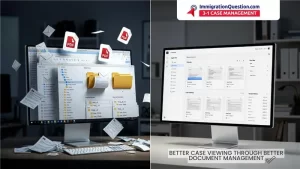
Case viewers allow legal professionals to see all matter‑specific information in a single, organized interface. This includes documents, tasks, deadlines, communication history, and roles of different parties involved.
Case viewers help streamline workflows and ensure attorneys have fast access to important case information.
Modern platforms connect matter folders, case details, and document libraries into one unified structure. This allows legal teams to simplify case navigation and reduce administrative effort, especially in matters involving large document sets or multiple participants.
How Legal Data Platforms Improve Case Organization
Legal data platforms combine document management, collaboration features, and secure access to create a comprehensive environment for managing case information.
Many top ranked systems highlight document storage, search tools, audit trails, and encrypted access as essential features that help legal teams stay organized.
These platforms also provide tools that support compliance, including detailed activity logs, versioning, structured document retention, and controlled access to sensitive information. Such features help law firms operate with clarity, consistency, and accountability.
How ImmigrationQuestion.com 3‑in‑1 Case Management Supports Case Viewing and Document Management
ImmigrationQuestion.com 3‑in‑1 Case Management aligns with many of the capabilities seen in strong legal data platforms by offering clear case visibility, structured document storage, and stable workflows for legal professionals.
Centralized Case Viewer
Leading case viewers offer a single location where legal teams can track documents, tasks, and case information. Systems such as StrongSuit demonstrate how matter portals connect all case files and details for efficient management.
ImmigrationQuestion.com 3‑in‑1 Case Management follows a similar structure, allowing attorneys to see case details through a centralized, organized view.
Secure Document Storage
Security is a core requirement in legal work. Evaluations of top legal document management systems show that encryption, access controls, and document governance are essential for protecting sensitive information.
ImmigrationQuestion.com 3‑in‑1 Case Management supports secure document handling, enabling law firms to maintain confidentiality and reduce compliance risks.
Organized File Retrieval and Version Control
Strong document management software offers intelligent search features, document classification, version histories, and structured file organization. ImmigrationQuestion.com 3‑in‑1 Case Management adopts a similar approach by keeping digital case files in organized structures that help attorneys quickly locate and manage documents.
Collaboration and Controlled Access
Document management software for law firms often includes permission controls, secure file sharing, and features that help teams collaborate on cases.
According to industry evaluations, structured collaboration environments help keep teams updated and reduce workflow friction. ImmigrationQuestion.com 3‑in‑1 Case Management uses controlled access to support communication and oversight across legal teams.
Document Management Software for Law Firms
Document management software for law firms focuses on storing and organizing matter files, managing email threads, and keeping critical documents accessible across teams. Legal industry comparison reports highlight that top DMS platforms support document version control, full text scanning, centralized storage, compliance features, and secure access permissions.
These features help firms reduce administrative workload and ensure that attorneys work from accurate and up‑to‑date case information.
Document Management Software For Lawyers
Document management software for lawyers is designed to support individual workloads by offering secure file access, mobile connectivity, and clear document tracking. Attorneys benefit from reliable search functions, file classification, and structured document categories that help them manage large caseloads with greater efficiency.
Modern systems also include client portals, case timelines, and secure messaging features that help lawyers maintain strong communication while keeping documents organized.
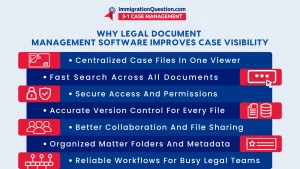
Key Benefits of Legal Document Management Software
Legal document management software helps legal professionals by:
- Reducing time spent manually sorting through files
- Improving accuracy through document version control
- Enhancing security with encrypted storage and access permissions
- Supporting unified collaboration across teams
- Giving attorneys clear visibility through organized document libraries
- Improving productivity by reducing administrative workload
When paired with strong case viewers and legal data platforms, these systems help law firms manage busy caseloads and deliver more consistent legal support.
Conclusion
Legal document management software has become essential for legal teams managing heavy document workflows. Case viewers and legal data platforms unify case details, organize documents, and ensure secure access across teams. ImmigrationQuestion.com 3‑in‑1 Case Management reflects many of these best practices by supporting organized storage, clear case visibility, and streamlined collaboration.
As more law practices transition to digital systems, document management software for lawyers and document management software for law firms will continue to play a foundational role in accuracy, efficiency, and client satisfaction.
Frequently Asked Questions
- What is legal document management software?
Legal document management software is a digital system for storing, organizing, and retrieving legal documents securely.
- Why do law firms need document management software?
It helps maintain secure file storage, consistent version control, and efficient organization of case documents.
- What is a case viewer in legal technology?
A case viewer centralizes case details, documents, and workflows into one organized interface.
- What features matter most in document management software for law firms?
Key features include encryption, searchability, version control, and structured document governance.
- Is ImmigrationQuestion.com 3‑in‑1 Case Management suitable for document workflows?
Yes. It supports secure storage, structured files, and organized case data.
- How does document management software help individual lawyers?
It improves file retrieval, reduces administrative work, and helps lawyers maintain accuracy while managing large caseloads.
- Do legal data platforms improve collaboration?
Yes. They organize documents and communication in one place, helping teams stay aligned.
- Why is secure access important in document management?
Secure access protects client confidentiality and ensures compliance with legal standards.