

A truly user-friendly law firm management software determines whether your team stays productive, organized, and profitable, or wastes hours fighting the system instead of practicing law.
Modern law firms don’t fail because they lack tools. They struggle because the tools they choose don’t match how legal professionals actually work.
Law firm management software is supposed to simplify operations, not introduce friction, confusion, or constant retraining. Yet many firms invest in platforms that look impressive in demos but fall apart in daily use.
User-friendliness isn’t a bonus feature. It’s the difference between the software your team adopts and the software they quietly avoid.
Why User-Friendly Law Firm Management Software Matters More Than Features
It’s easy to be distracted by feature lists.
Dashboards, automation, reporting, integrations; every vendor promises it all. But law firm management only improves when the system feels intuitive to the people using it every day.
If attorneys need workarounds to complete basic tasks, the software is already failing. If staff require repeated explanations, productivity drops. If onboarding takes weeks instead of days, resistance grows.
True law firm management software works with your workflow, not against it. The goal is clarity, speed, and confidence; not complexity disguised as power.
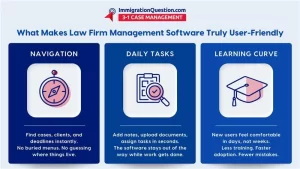
Start With the First 5 Minutes: The Immediate Usability Test
One of the simplest ways to judge user-friendliness is what happens in the first five minutes after logging in. Can a new user understand where to click without instructions? Can they locate a case, add a note, or check a deadline without searching through menus?
Strong legal practice software doesn’t rely on manuals to explain basic actions. It uses clear language, logical layouts, and predictable navigation. The labels make sense, and buttons are where you expect them to be. Nothing feels hidden.
If the platform feels overwhelming immediately, it will only feel worse under pressure.
Navigation Should Match How Law Firms Work
Legal professionals don’t think in abstract categories. They think in cases, clients, deadlines, and tasks. User-friendly law office software reflects this mental model.
Cases should be easy to find. Related documents, communications, and timelines should live together. Switching between matters should feel seamless, not disruptive. The software should reduce mental load, not increase it.
This is where many legal software solutions miss the mark. They organize information based on engineering logic rather than legal workflows. When that happens, attorneys adapt their work to the system instead of the system adapting to the firm.
Daily Tasks Should Feel Effortless, Not Engineered
The best attorney software fades into the background during daily work. Creating tasks, updating case notes, uploading documents, and assigning responsibilities should take seconds, not careful planning.
User-friendly law firm management software minimizes clicks. It avoids unnecessary confirmation screens. It allows users to complete actions naturally, without stopping to think about how the software wants things done.
When every small action feels smooth, teams work faster without realizing it. That’s the mark of good design.
Training Time Reveals Everything
How long does it take to train a new hire? This question alone can tell you whether a platform is intuitive.
If onboarding requires extensive documentation, live walkthroughs, and constant support, the software isn’t intuitive. Effective legal practice software should allow most users to become comfortable within days.
Short learning curves lead to faster adoption, fewer mistakes, and lower resistance from experienced staff who don’t want to relearn how to work.
Flexibility Without Confusion Is Key
Law firms don’t all operate the same way. User-friendly law office software allows customization without turning the system into a maze. Users should be able to adjust views, workflows, and permissions while still keeping the interface clean and understandable.
Rigid systems frustrate firms. Overly customizable systems overwhelm them. The balance lies in thoughtful flexibility—tools that adapt without sacrificing simplicity.
This balance is what separates truly effective legal software solutions from platforms that look good on paper but struggle in real life.
Cloud Access and Remote Use
Modern law firm management increasingly depends on cloud case management. Attorneys work from court, home, and client meetings. Staff collaborate across locations. Remote access should feel identical to office access.
User-friendly cloud case management doesn’t require special steps, extra logins, or scaled-down features. Everything should work the same, everywhere. When remote access feels natural, productivity stays consistent regardless of location.
If remote use introduces friction, the software isn’t ready for modern practice.
Support and Feedback Loops Matter
Even the best systems need support. User-friendly platforms make help easy to find and easy to understand. Support resources should be clear, responsive, and written for legal professionals, not developers.
More importantly, strong law firm management software evolves based on user feedback. When updates improve usability instead of complicating it, that’s a sign the platform understands its audience.
The Long-Term Cost of Poor Usability
Low office software pricing often looks appealing upfront, but poor usability carries hidden costs. Lost time, reduced morale, training fatigue, and errors add up quickly. Over time, inefficient tools cost far more than they save.
Strong law firm management software pays for itself by increasing consistency, reducing friction, and allowing attorneys to focus on billable work instead of system navigation.
Choosing Software That Actually Works for Your Firm
User-friendly law firm management software doesn’t shout about features; it quietly supports your team every day. It feels intuitive, reduces friction, and grows with your firm instead of slowing it down.
With ImmigrationQuestion.com 3-1 case management, you get case workflows, documents, and communication in a single environment that supports attorneys without forcing them to adapt to unnatural software behavior.
The system mirrors how legal work actually moves, from intake to resolution, making it easier to navigate, and easier to adopt over time.

Frequently Asked Questions
1. What makes law firm management software user-friendly?
Clear navigation, logical workflows, minimal training requirements, an intuitive design that mirrors how legal professionals actually work.
2. How long should it take to learn new legal practice software?
Most users should feel comfortable within a few days. If training takes weeks, usability is likely an issue.
3. Is cloud case management harder to use than desktop systems?
No. Well-designed cloud case management should feel just as natural as traditional systems.
4. Can low office software still be user-friendly?
Price doesn’t determine usability. Some affordable platforms are intuitive, while expensive ones can be unnecessarily complex.
5. How do I test attorney software before committing?
Have multiple team members perform daily tasks during a trial period and observe where they struggle or hesitate.
6. Why do firms abandon legal software solutions after adoption?
Most failures stem from poor usability, not missing features. If people don’t enjoy using the system, adoption collapses.