


Adopting legal software can feel like stepping into a completely new way of working. For many law firms and solo practitioners, the transition is not just about learning a tool. It is about reshaping daily workflows, habits, and expectations. While the promise of efficiency and automation is appealing, the learning curve often becomes the biggest concern.
Understanding what to expect can make the transition smoother and far less frustrating.
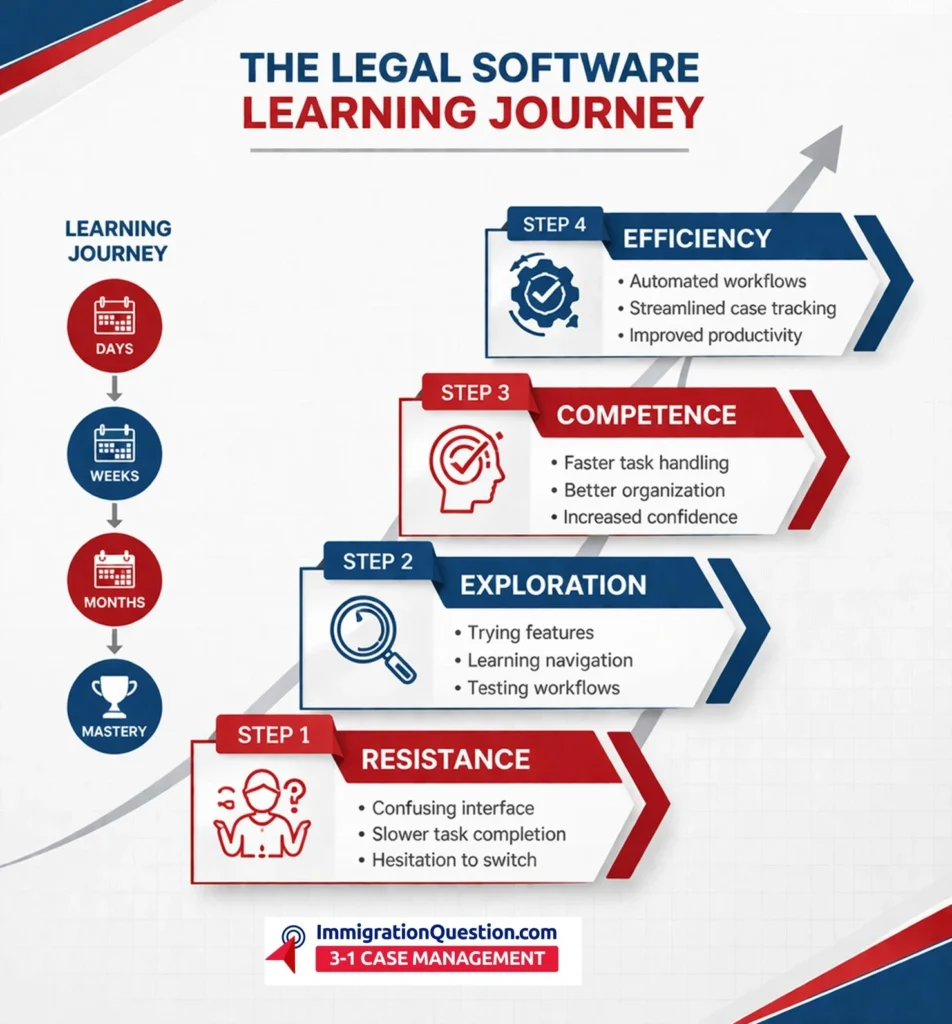
Why Legal Software Feels Difficult at First
Legal professionals are trained to think critically, not necessarily to adapt quickly to new technology. That is one reason the early stages of using case management or document systems can feel overwhelming.
Here are a few common reasons:
- Complex interfaces with too many features at once
- New terminology that differs from traditional legal processes
- Workflow disruption, especially when moving from manual or paper-based systems
- Fear of making mistakes in sensitive client data
This initial friction is normal. It does not mean the software is bad. It usually means the onboarding process needs time.
The Four Stages of the Learning Curve
Most users go through predictable stages when adopting legal software.
1. Initial Resistance
At the beginning, there is hesitation. Lawyers often compare the new system with their existing methods and find it slower.
- Tasks feel longer
- Navigation is confusing
- Productivity may temporarily drop
This stage is psychological as much as technical.
2. Exploration and Trial
Once users begin experimenting, they start discovering features that actually help.
- Learning how to manage cases digitally
- Uploading and organizing documents
- Trying automation tools like reminders and templates
This is where curiosity replaces resistance.
3. Gradual Competence
With repeated use, the system starts making sense.
- Tasks become faster
- Workflows feel more natural
- Confidence increases
At this stage, users begin to rely on the software instead of avoiding it.
4. Full Adoption and Efficiency
Eventually, the software becomes part of daily operations.
- Reduced manual work
- Better case tracking
- Improved client communication
- Time savings across the board
This is when the real return on investment becomes visible.
How Long Does It Take to Learn Legal Software?
There is no single answer, but most users fall into this general timeline:
- First few days: Basic navigation and setup
- First 2 weeks: Comfortable with core features
- 1 to 2 months: Efficient daily usage
- 3+ months: Advanced usage and automation
The timeline depends heavily on how intuitive the software is and how much training is provided.
What Makes the Learning Curve Easier
Not all legal software is created equal. Some platforms are built with usability in mind, while others prioritize features over experience.
Here is what reduces the learning curve:
- Clean, simple interface instead of cluttered dashboards
- Guided onboarding with tutorials or walkthroughs
- Customer support that actually responds quickly
- Role-based features tailored for lawyers, paralegals, and admins
- Automation tools that reduce repetitive tasks
Software that focuses on user experience tends to be adopted much faster.
Common Mistakes to Avoid
Many firms unintentionally make the learning process harder than it needs to be.
Avoid these pitfalls:
- Trying to learn everything at once
- Skipping onboarding or training sessions
- Not assigning a point person for implementation
- Ignoring customization options
- Switching systems too frequently
A phased approach always works better than rushing adoption.
The Hidden Cost of a Steep Learning Curve
When legal software is too complicated, the cost is not just frustration.
It can lead to:
- Lost billable hours
- Low team adoption
- Data entry errors
- Abandoned systems
In some cases, firms go back to manual processes, which defeats the entire purpose of adopting technology.
Choosing Software with a Shorter Learning Curve
The smartest move is not just choosing powerful software. It is choosing software that your team will actually use.
Before deciding, consider:
- Can a new user understand it within minutes?
- Does it simplify daily legal tasks?
- Is training minimal or extensive?
- Does it integrate easily into existing workflows?
Ease of use is often more valuable than having dozens of advanced features.
Make the Shift Without the Struggle
The learning curve of legal software is real, but it does not have to be painful. With the right expectations and the right platform, the transition can be smooth and even empowering.
If you are looking for a solution designed with simplicity and usability in mind, explore the ImmigrationQuestion.com 3-in-1 Case Management. It combines case tracking, client communication, and document management into one intuitive system built specifically for legal professionals.

Frequently Asked Questions
Why is legal software hard to learn?
Legal software can feel complex because it introduces new workflows, terminology, and systems that differ from traditional legal practices.
How can I reduce the learning curve?
Start with core features, follow onboarding guides, and use customer support whenever needed instead of trying to learn everything at once.
How long does it take to become comfortable with legal software?
Most users become comfortable within 2 to 4 weeks, with full efficiency developing over a few months.
Is training necessary for legal software?
Yes, even basic training can significantly improve adoption and reduce errors during the early stages.
What should I look for in easy-to-use legal software?
Look for a simple interface, helpful support, minimal setup time, and features that align with your daily legal tasks.